drone 无人机
[!TIP]
刚接触时认为这东西很好用, 后来觉得设计上有些先天缺陷。
背景
先说几句闲话,docker这个概念刚出的时候,我其实已经关注到了。
大概在14年到15年时,我已经在非生产环境推行docker了,尝试将例如原来在使用 zabbix, nginx, tomcat, memcache等, 以及一些小的管理系统,还有一些工作中自己开发的python服务给容器化。
但之后几年时间反复前进后退,没有什么实质行的进展。
直到18-19年上云的大背景下,才集中一波将当时项目的生产环境的业务给容器化。
原因一直很清楚,就是上容器很简单,但是更新困难。
比如 python 程序,你发现有个字符串需要改, 原本直接 vi 编辑加 restart 即可;
现在却要提交代码,重新打镜像,上传,拉镜像,更新服务,步骤太繁琐啦。
为什么不自动化实现这些步骤呢?
原因是当时要实现这些,基本上只有两种方案,
- 写大量shell脚本
- jenkins
我以前写过很多 bash 脚本,几乎写吐,实在是不想写了,被里面各种特性,各种奇淫技巧,和隐藏的各种陷阱杀害了太多脑细胞。
而且很明显 bash 并不适合完成太大的流程。
然后就是 jenkins, 我从14年开始接触这个工具,直到今天我依然不喜欢,复杂+繁琐,我几乎每年都要重新学一遍,然后再忘一遍。
直到 drone 这个系统的出现,终于感觉有个好用 CI 工具的了。
drone 简介
- go 开发,意味着部署简单
- master+slave 结构,扩展方便
- 容器化,全程使用 docker 完成
- 插件支持友好
我个人认为最大的优点是 插件友好;
插件简介
- 一个插件就是一个容器,简介
- 插件无依赖关系,对离线环境极为友好;
jenkins 的离线环境装更新插件就非常难处理依赖关系;
当然 jenkins 离线首次安装时插件可以直接拷贝进去,但后面再加就不好办了
- 插件支持 go 开发,也支持 sh 开发
- 无用户体系,直接使用 git 源的账户系统
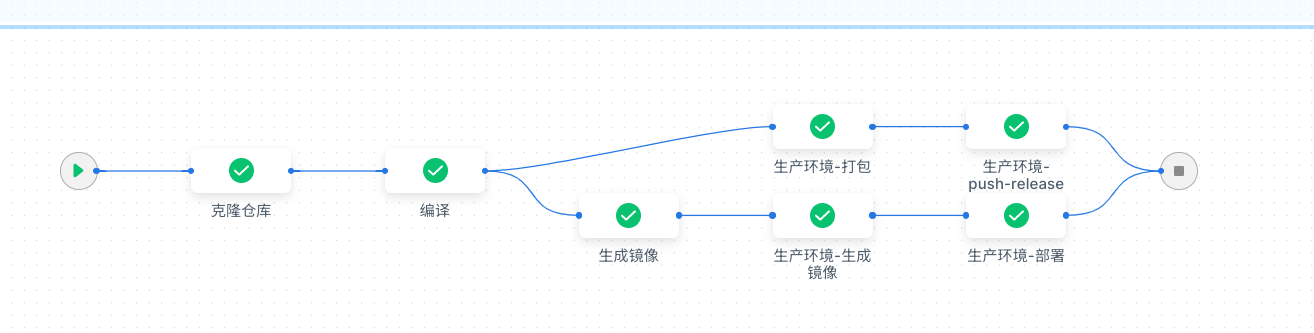
- 编排文件 .drone 采用 yml 结构,比 Jenkis 的 Jenkinsfile 文件格式友好太多
而且可以很方便的看到部署流程图
缺点
有几个不得不说的注意事项
drone 分开源版本和企业版本;
开源版本需要自己编译生成二进制文件或镜像; 官方释放出来的包其实是企业版本的;
企业版本默认是有很多限制的, 但在特定情况下是可以免费使用的;
- 一年构建次数不超过 5000 次
- 企业年收入低于 100 万美元, 或融资少于 500 万美元
主要就这个限制, 超出后按协议需要付费;
个人使用的话,一般一年不会超出这个次数限制;
企业使用的话,其实影响也不大,
到次数前把库删除服务重新部署一份就是,
受影响的也就 保存的一些 secret 和 构建历史记录, 这些都好重建或干脆删除;
如果对这个商用协议很敏感的话,还有2个办法
- 通过开源版本自己编译一份
- 使用完全开源的 woodpecker(啄木鸟) 来平替 drone
使用方式
- 物理机方式
部署一个 server 和 一个以上 runner
- docker-compose 方式
- k8s 内部署方式
不同的部署方式影响一些插件的使用和 pipeline 的类型;
k8s环境使用事项
- 因为当前 k8s 环境没有使用 docker, 所以镜像打包用的是 google 的 kaniko 工具来打包
- 一个 pipeline 本质上就是一个 pod, 每个 step 实际上就是这个 pod 内的一个容器
- runner 因为要创建新的 pod, 所以需要 api 权限, 这里创建了 sa, 并绑定了创建 pod 的权限;
- 因为运行机器的不确定性, 所以编译缓存我们使用了一个 pvc 来单独放置
- 这里有使用 drone-k8s-plugin 插件发布 yml 资源文件到集群, 所以需要还需要一个 sa 帐号
部署
目前使用 docker-compose 的方式应该是主流的方式
docker-compose.yml
注解:
-
registry.wait 为离线的私有仓库,
git.services.wait 为离线的 gitea 仓库
-
用户 master 和 slave 通信的 DRONE_RPC_SECRET 是随便生成的;
-
Gitea OAuth 需要在 gitea 上配置一个应用和返回时的地址
-
特别注意的是 drone 没有账号体系,使用的是 gitea 里面的账号;
这里指定管理员时,需要指定 gitea 的用户登录帐号, 注意不是别名或邮箱地址。
-
本例使用了 traefik 作为统一的入口
-
存储和网络都是 external 类型的, 所以需要手动创建
  1
  2
  3
  4
  5
  6
  7
  8
  9
 10
 11
 12
 13
 14
 15
 16
 17
 18
 19
 20
 21
 22
 23
 24
 25
 26
 27
 28
 29
 30
 31
 32
 33
 34
 35
 36
 37
 38
 39
 40
 41
 42
 43
 44
 45
 46
 47
 48
 49
 50
 51
 52
 53
 54
 55
 56
 57
 58
 59
 60
 61
 62
 63
 64
 65
 66
 67
 68
 69
 70
 71
 72
 73
 74
 75
 76
 77
 78
 79
 80
 81
 82
 83
 84
 85
 86
 87
 88
 89
 90
 91
 92
 93
 94
 95
 96
 97
 98
 99
100
101
102
103
104
105
106
107
108
109
110
111
112
113
114
|
version: '3'

services:

  drone-server:
    image: registry.wait/cwx/drone/drone:2.16.0
    # ports:
    #   - 80:80
    #   - 443:443

    restart: unless-stopped
    networks:
      - services
    # privileged: true
    environment:

      # GITEA 配置(OAuth2)

      # Gitea OAuth 客户端 ID
      - DRONE_GITEA_CLIENT_ID=3dee43ca-55c2-4878-b912-5fe892cc6f4b
      # Gitea OAuth 客户端密钥
      - DRONE_GITEA_CLIENT_SECRET=gto_rkxuxkaneyrxpuji5i3hwvunhlzd3sfhhifhn4z5qj23u6hz2nu3
      # Gitea 服务器地址
      - DRONE_GITEA_SERVER=https://git.services.wait
      # - DRONE_GITEA_SERVER=http://10.2.1.5:3000

      # 和 runner 通信的 rpc 密钥
      - DRONE_RPC_SECRET=12e42a821c41754db091b62d899edff7

      # drone server 的服务地址; IP或域名
      - DRONE_SERVER_HOST=drone.services.wait

      # - DRONE_TLS_AUTOCERT=false

      - DRONE_SERVER_PROTO=https

      # - DRONE_SERVER_PROTO=https
      # - DRONE_TLS_CERT=/certs/services.wait.pem
      # - DRONE_TLS_KEY=/certs/services.wait-key.pem

      - DRONE_LOGS_DEBUG=true

      # - DRONE_GIT_ALWAYS_AUTH=false

      # 创建管理员账户, 这里对应为 gitee 的用户名(也就是登录的账号,不是昵称)
      # 也就是说 这个外部帐号会作为管理员
      # 说明, 这里应该是 gitee 内的登录帐号, 不是别名或邮箱
      - DRONE_USER_CREATE=username:chenwx,admin:true

      # 数据库默认是 sqlite
      # - DRONE_DATABASE_DRIVER=mysql
      # - DRONE_DATABASE_DATASOURCE=root:password@tcp(1.2.3.4:3306)/drone?parseTime=true
    volumes:
      - drone_data:/data
      # - ./ssl/services.wait.pem:/certs/services.wait.pem:ro
      # - ./ssl/services.wait-key.pem:/certs/services.wait-key.pem:ro
      - ./ssl/cwxCA.pem:/etc/ssl/certs/cwxCA.pem:ro
    labels:
      - "service_name=drone"
      - "traefik.enable=true"
      - "traefik.http.routers.droneHttps.entrypoints=https"
      - "traefik.http.routers.droneHttps.service=droneServer"
      - "traefik.http.routers.droneHttps.rule=Host(`drone.services.wait`)"
      - "traefik.http.routers.droneHttps.tls=true"
      - "traefik.http.services.droneServer.loadbalancer.server.port=80"
    logging:
      options:
        labels: "service_name"


  drone-docker-runner:
    # container_name: drone-runner
    image: registry.wait/cwx/drone/drone-runner-docker:1.8.3
    # restart: always
    # privileged: true
    networks:
      - services
    environment:

      # 用于连接到 Drone 服务器的协议; http 或 https
      # - DRONE_RPC_PROTO=https
      - DRONE_RPC_PROTO=https

      # 用于连接到 Drone 服务器的主机名
      - DRONE_RPC_HOST=drone.services.wait

      # server rpc key
      - DRONE_RPC_SECRET=12e42a821c41754db091b62d899edff7

      # 限制运行程序可以执行的并发管道数
      - DRONE_RUNNER_CAPACITY=2

      # 自定义 docker runner 节点名称
      - DRONE_RUNNER_NAME=docker-runner-1
      # - DRONE_RUNNER_NETWORKS=drone_default

      # - DRONE_DEBUG=true                      # 调试相关, 部署的时候建议先打开
      # - DRONE_LOGS_DEBUG=true                 # 调试相关, 部署的时候建议先打开
      # - DRONE_LOGS_TRACE=true                 # 调试相关, 部署的时候建议先打开
      - TZ=Asia/Shanghai

    volumes:
      - /var/run/docker.sock:/var/run/docker.sock
      - /home/wait/data/ca/cwxCA.pem:/etc/ssl/certs/cwxCA.pem:ro


volumes:
  drone_data:
    external: true


networks:
  services:
    external: true
|
项目实例
实例1: nodejs 项目
.drone.yml 文件示例
注解:
- 需要在 ui 页面上配置2个 secrets 密钥;
dockerconfigjson 是私有 docker 仓库的配置,
wcn7_wait_key 是目标 ssh 主机的ssh密钥。
- 离线部署时,可以先将需要的镜像都上传到私有镜像仓库,
本例 registry.wait 即内部仓库地址
- drone-volume-cache 目的是将 node_modules 内容进行缓存和加载,避免反复拉取;
- http://10.2.1.5:4873/ 这个地址是私有化的 node 仓库
- gitea-release 插件的目的是在 tag 编译后,将 release 发布到仓库
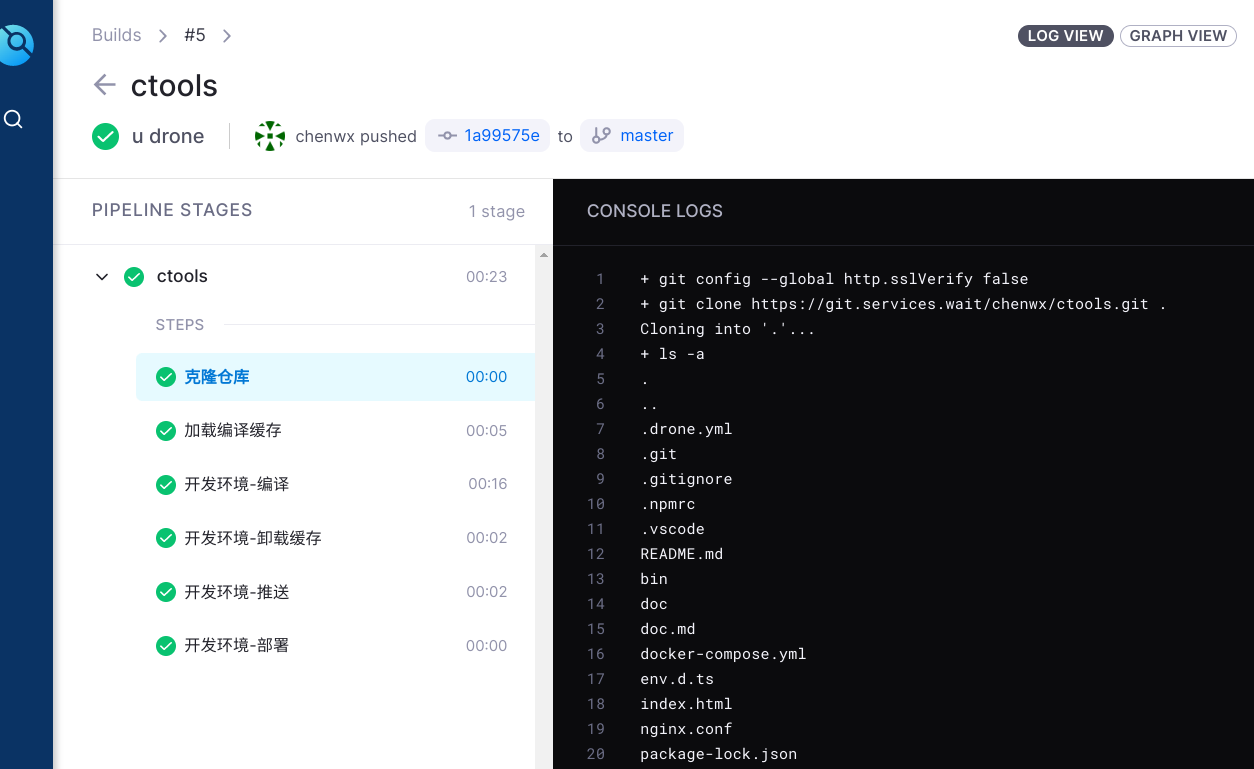
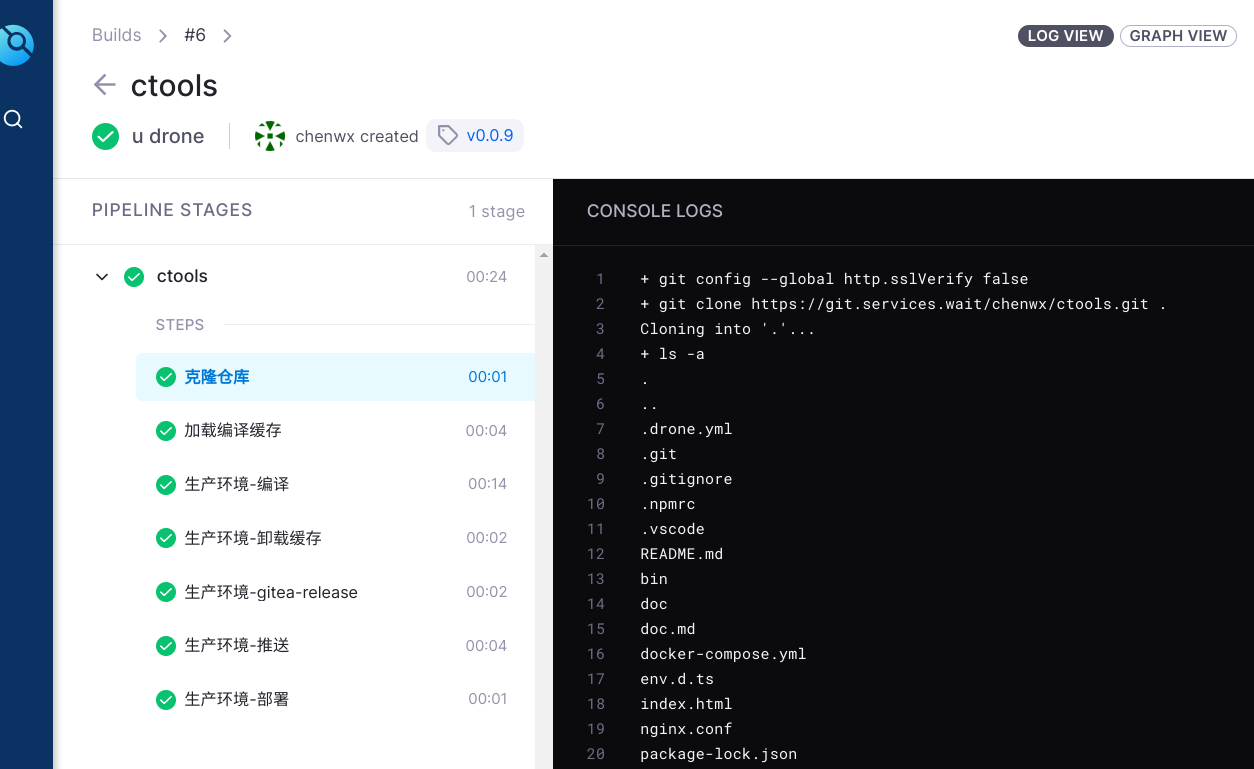
- 效果就是普通的提交,走普通流程,发布到测试环境;
带 tag 的提交走新流程, 发布 release 到 gitea 仓库。
  1
  2
  3
  4
  5
  6
  7
  8
  9
 10
 11
 12
 13
 14
 15
 16
 17
 18
 19
 20
 21
 22
 23
 24
 25
 26
 27
 28
 29
 30
 31
 32
 33
 34
 35
 36
 37
 38
 39
 40
 41
 42
 43
 44
 45
 46
 47
 48
 49
 50
 51
 52
 53
 54
 55
 56
 57
 58
 59
 60
 61
 62
 63
 64
 65
 66
 67
 68
 69
 70
 71
 72
 73
 74
 75
 76
 77
 78
 79
 80
 81
 82
 83
 84
 85
 86
 87
 88
 89
 90
 91
 92
 93
 94
 95
 96
 97
 98
 99
100
101
102
103
104
105
106
107
108
109
110
111
112
113
114
115
116
117
118
119
120
121
122
123
124
125
126
127
128
129
130
131
132
133
134
135
136
137
138
139
140
141
142
143
144
145
146
147
148
149
150
151
152
153
154
155
156
157
158
159
160
161
162
163
164
165
166
167
168
169
170
171
172
173
174
175
176
177
178
179
180
181
182
183
184
185
186
187
188
189
190
191
192
193
194
195
196
197
198
199
200
201
202
203
204
205
206
207
208
209
210
211
212
213
214
215
216
217
218
219
220
221
222
223
224
225
226
227
228
229
230
231
232
233
234
235
236
237
238
239
240
241
242
243
244
245
246
247
248
249
250
251
252
253
254
255
256
257
258
259
260
261
262
263
264
265
266
267
268
269
270
271
272
273
274
275
276
277
278
279
280
|
kind: pipeline
name: ctools
type: docker

# 私有镜像站认证信息
image_pull_secrets:
  - dockerconfigjson

# 因为有个性化的 clone 需求,所以这里关闭默认的 clone 动作
clone:
  disable: true

steps:
- name: 克隆仓库
  # image: drone/git
  image: registry.wait/cwx/drone/git
  pull: if-not-exists
  settings:

    # clone 时截断以前的提交记录, 即克隆深度
    depth: 1
    skip_verify: true

    # 读取 git 的 tag 作为环境变量 ${DRONE_TAG}
    tags: true

  # 因为没能解析到名字,临时加一下 hosts
  # extra_hosts:
  #   - "git.services.wait:10.2.1.5"
  commands:
    - git config --global http.sslVerify false
    - git clone https://git.services.wait/chenwx/ctools.git .
    - ls -a
    - git log --oneline -n 5


# 使用缓存避免反复从网络上下载依赖包
# - name: restore-cache
- name: 加载编译缓存
  image: registry.wait/cwx/drone/drillster/drone-volume-cache
  # image: drillster/drone-volume-cache

  # 默认各阶段是并行处理的, 需要定义依赖关系
  depends_on: [克隆仓库]
  volumes:
    - name: cache
      path: /cache
  settings:
    # 从以前的构建中恢复缓存,即拷贝这个目录下的内容到容器内
    restore: true
    mount:
      - ./node_modules

# - name: build
- name: 开发环境-编译
  # image: node:19.9.0
  image: registry.wait/cwx/node:19.9.0
  pull: if-not-exists
  depends_on: [加载编译缓存]
  commands:
    - ls -a
    - node -v
    - npm get registry
    - npm config set registry http://10.2.1.5:4873/
    - npm install
    - npm run build
    - cd dist
    - tar zcvf ctools-0.1.tar.gz ./*

  # 排除全部tag,即不匹配任何 tag
  when:
    ref:
      exclude:
        - refs/tags/**

# 具有 tag 时的编译动作
# - name: build-tag
- name: 生产环境-编译
  # image: node:19.9.0
  image: registry.wait/cwx/node:19.9.0
  pull: if-not-exists
  depends_on: [加载编译缓存]
  commands:
    - ls -a
    - node -v
    - npm install
    - npm run build
    - cd dist
    - tar zcvf ctools-${DRONE_TAG##v}.tar.gz ./*
    - ls

  # 匹配全部tag
  when:
    ref:
      - refs/tags/**

# 将缓存文件卸载
# - name: rebuild-cache
- name: 开发环境-卸载缓存
  image: registry.wait/cwx/drone/drillster/drone-volume-cache
  # image: drillster/drone-volume-cache
  pull: if-not-exists
  depends_on: [开发环境-编译]
  volumes:
    - name: cache
      path: /cache
  settings:
    # 重新创建缓存, 即将文件写回到宿主机
    rebuild: true
    mount:
      - ./node_modules
  when:
    ref:
      exclude:
        - refs/tags/**

# 为有 tag 的情况
# - name: rebuild-cache-tag
- name: 生产环境-卸载缓存
  # image: drillster/drone-volume-cache
  image: registry.wait/cwx/drone/drillster/drone-volume-cache
  pull: if-not-exists
  depends_on: [生产环境-编译]
  volumes:
    - name: cache
      path: /cache
  settings:
    rebuild: true
    mount:
      - ./node_modules
  when:
    ref:
      - refs/tags/**


# 提交一个 release 版本到 gitea
# gitea-release 插件只适用于有 tag 的情况
# - name: gitea_release
- name: 生产环境-gitea-release
  # image: plugins/gitea-release
  image: registry.wait/cwx/drone/plugins/gitea-release
  pull: if-not-exists
  depends_on: [生产环境-编译]
  settings:
    api_key: 2a5ab57061a66a6f37233a3fac07029cb5ad6b76
    base_url: https://git.services.wait/
    files:
      # 上传文件时,把那个 v 前缀去掉
      - dist/ctools-${DRONE_TAG##v}.tar.gz

    # 如果存在则覆盖
    file_exists: overwrite
    title: 新版本发布-${DRONE_TAG}

    # 忽略 https 证书
    insecure: true
  volumes:
    - name: cwxCA
      path: /etc/ssl/certs/ca-certificates.crt
  # extra_hosts:
  #   - "git.services.wait:10.2.1.5"

  when:
    ref:
      - refs/tags/**


# 使用 scp 传输到其它主机
# - name: deployment
- name: 开发环境-推送
  # image: appleboy/drone-scp
  image: registry.wait/cwx/drone/appleboy/drone-scp
  pull: if-not-exists
  depends_on: [开发环境-编译]
  settings:
    host: 10.2.1.5
    username: wait
    # password:
    #   # 密码使用单独存储在 drone 上的密码
    #   from_secret: wcn7_wait_pw

    key:
      from_secret: wcn7_wait_key

    port: 22
    # 目标: /home/wait/chenwx/ctools/ctools-0.1.tar.gz
    target: /home/wait/${DRONE_REPO_OWNER}/${DRONE_REPO_NAME}
    source: dist/ctools-0.1.tar.gz
  when:
    ref:
      exclude:
        - refs/tags/**


# 推送到生产环境
# - name: deployment-production
- name: 生产环境-推送
  # image: appleboy/drone-scp
  image: registry.wait/cwx/drone/appleboy/drone-scp
  pull: if-not-exists
  depends_on: [生产环境-编译]
  settings:
    host: 10.3.0.2
    username: wait
    key:
      from_secret: wcn7_wait_key
    port: 39022
    # 目标: /home/wait/data/pkg/ctools-0.1.tar.gz
    target: /home/wait/data/pkg
    source: dist/ctools-${DRONE_TAG##v}.tar.gz
  when:
    ref:
      - refs/tags/**

# 到远程主机执行命令
# - name: ssh
- name: 开发环境-部署
  # image: appleboy/drone-ssh
  image: registry.wait/cwx/drone/appleboy/drone-ssh
  pull: if-not-exists
  depends_on: [开发环境-推送]
  settings:
    host:
      - 10.2.1.5
    username: wait
    # password:
    #   from_secret: wcn7_wait_pw

    key:
      from_secret: wcn7_wait_key

    port: 22
    command_timeout: 1m
    script:
      - cd /home/wait/chenwx/ctools
      - rm -rf tmp2 && mkdir tmp2
      - tar xvf dist/ctools-0.1.tar.gz -C tmp2/
      - rm -rf /home/wait/data/tools/*
      - mv tmp2/* /home/wait/data/tools/
  when:
    ref:
      exclude:
        - refs/tags/**


# 生产环境-部署命令
# - name: ssh-production
- name: 生产环境-部署
  # image: appleboy/drone-ssh
  image: registry.wait/cwx/drone/appleboy/drone-ssh
  pull: if-not-exists
  depends_on: [生产环境-推送]
  settings:
    host:
      - 10.3.0.2
    username: wait
    key:
      from_secret: wcn7_wait_key

    port: 39022
    command_timeout: 1m
    script:
      - cd /home/wait/data/pkg
      - rm -rf tmp2 && mkdir tmp2
      - tar xvf dist/ctools-${DRONE_TAG##v}.tar.gz -C tmp2/
      - rm -rf /home/wait/data/tools/*
      - mv tmp2/* /home/wait/data/tools/
  when:
    ref:
      - refs/tags/**

volumes:
  - name: cache
    host:
      path: /data/cache
  - name: cwxCA
    host:
      path: /home/wait/data/ca/cwxCA.pem
      # path: /home/wait/code/ssl/ca/cwxCA.pem
|
开发环境发布
git push
生产环境发布
git tag v0.0.9
git push origin v0.0.9
实例2: go项目示例
调试截图

**成功流程

完整清单
  1
  2
  3
  4
  5
  6
  7
  8
  9
 10
 11
 12
 13
 14
 15
 16
 17
 18
 19
 20
 21
 22
 23
 24
 25
 26
 27
 28
 29
 30
 31
 32
 33
 34
 35
 36
 37
 38
 39
 40
 41
 42
 43
 44
 45
 46
 47
 48
 49
 50
 51
 52
 53
 54
 55
 56
 57
 58
 59
 60
 61
 62
 63
 64
 65
 66
 67
 68
 69
 70
 71
 72
 73
 74
 75
 76
 77
 78
 79
 80
 81
 82
 83
 84
 85
 86
 87
 88
 89
 90
 91
 92
 93
 94
 95
 96
 97
 98
 99
100
101
102
103
104
105
106
107
108
109
110
111
112
113
114
115
116
117
118
119
120
121
122
123
124
125
126
127
128
129
130
131
132
133
134
135
136
137
138
139
140
141
142
143
144
145
146
147
148
149
150
151
152
153
154
155
156
157
158
159
160
161
162
163
164
165
166
167
168
169
170
171
172
173
174
175
176
177
178
179
180
181
182
183
184
185
186
187
188
189
190
191
192
193
194
195
196
197
198
199
200
201
202
203
204
205
206
207
208
209
210
211
212
213
214
215
216
217
218
219
220
221
222
223
224
225
226
227
228
229
230
231
232
233
234
235
236
237
238
239
240
241
242
243
244
245
246
247
248
249
250
251
252
253
254
255
256
257
258
259
260
261
262
263
264
265
266
|
kind: pipeline
type: kubernetes
name: cwxgoweb-dev
service_account_name: drone

clone:
  disable: true

# main 分支 + push
trigger:
  branch:
    - main
  event:
    - push

volumes:
- name: gopath-cache
  claim:
    name: gobuild-cache
    read_only: false


steps:

- name: 启动无人机
  image: registry.services.wait/cwx/os/alpine:3.18.3
  commands:
    - echo "测试启动 drone 成功"

- name: 克隆仓库
  image: registry.services.wait/cwx/drone/git
  pull: if-not-exists
  depends_on: [启动无人机]
  settings:

    # clone 时截断以前的提交记录, 即克隆深度
    depth: 1
    skip_verify: true

    # 读取 git 的 tag 作为环境变量 ${DRONE_TAG}
    tags: true
  environment:
    GITEA_TOKEN:
      from_secret: git_token

  commands:
    - git config --global http.sslVerify false

    # 通过 token 拉取代码
    - git clone https://chenwx:$GITEA_TOKEN@git.services.wait/chenwx/cwxgoweb.git .

    # 输出最近 5 次 commit 信息
    - git log --oneline -n 5
    - pwd
    - ls -a

- name: 编译
  image: registry.services.wait/cwx/golang:1.21.0
  pull: if-not-exists
  depends_on: [克隆仓库]

  # 挂载编译缓存
  volumes:
  - name: gopath-cache
    path: /go
  commands:
    - go env -w GOPROXY=http://nexus.services.wait/repository/proxy-go/
    - go env -w GOSUMDB=off
    - export CGO_ENABLED=0
    - go build -o cwxgoweb src/main.go
    # - go build -o cwxgoweb -ldflags '-s -w' src/main.go
    - ls -a

# 制作镜像
- name: 生成镜像
  image: registry.services.wait/cwx/kaniko-project/executor:v1.15.0-debug
  pull: if-not-exists
  depends_on: [ 编译 ]
  environment:
    CA_CERTIFICATE:
      from_secret: ca_wait

    DOCKER_AUTH_FILE:
      from_secret: docker_user_wait_conf

  commands:
    # 一张内部的CA证书
    - echo "$CA_CERTIFICATE" >> /kaniko/ssl/certs/additional-ca-cert-bundle.crt
    # docker 仓库认证文件 .docker/config.json
    - echo $DOCKER_AUTH_FILE > /kaniko/.docker/config.json

    - /kaniko/executor
      --context "."
      --dockerfile "deploy/docker/drone/dockerfile"
      --destination "registry.services.wait/cwx/cwxgoweb:latest"

# 发布k8s集群
- name: deploy
  image: registry.services.wait/cwx/zc2638/drone-k8s-plugin:0.0.4
  pull: if-not-exists
  depends_on: [ 克隆仓库 ]
  settings:
    k8s_server: https://kubernetes.default.svc.cluster.local
    k8s_token:
      from_secret: k8s_token
    k8s_ca_crt:
      from_secret: k8s_ca_crt
    k8s_skip_tls: false
    namespace: cwx

    templates:
      - deploy/kubernetes/devel/deployment.yml
      - deploy/kubernetes/devel/IngressRoute.yml
      - deploy/kubernetes/devel/services.yml
    # app_name: ${DRONE_REPO_NAME}

    debug: true


---
# 流水线2
# 生产环境打包, 只对带 tag 的事件触发执行

kind: pipeline
type: kubernetes
name: cwxgoweb-pro
service_account_name: drone

# 触发器这里 tag 不能和分支一起使用, 因为 tag 和 分支是没有关系的
trigger:
  event:
    - tag

volumes:
- name: gobuild-cache
  claim:
    name: gobuild-cache
    read_only: false


# 因为有个性化的 clone 需求, 所以这里关闭默认的 clone 动作
clone:
  disable: true

steps:
- name: 克隆仓库
  image: registry.services.wait/cwx/drone/git
  pull: if-not-exists
  settings:
    depth: 1
    skip_verify: true
    tags: true
  environment:
    GITEA_TOKEN:
      from_secret: git_token

  # 注意为了避免 tag 比 main 分支先提交的情况
  # 这里需要固定拉取 此 tag
  commands:
    - git config --global http.sslVerify false
    - git clone -b ${DRONE_TAG} --depth=1 https://chenwx:$GITEA_TOKEN@git.services.wait/chenwx/cwxgoweb.git .
    - pwd
    - ls -a

- name: 编译
  image: registry.services.wait/cwx/golang:1.21.0
  pull: if-not-exists
  depends_on: [克隆仓库]

  volumes:
  - name: gopath-cache
    path: /go

  commands:
    # - go env -w GOPROXY=http://10.2.1.4:8081/repository/group-go/
    - go env -w GOPROXY=http://nexus.services.wait/repository/proxy-go/
    - go env -w GOSUMDB=off
    - export CGO_ENABLED=0
    - go build -o cwxgoweb src/main.go
    # - go build -o cwxgoweb -ldflags '-s -w' src/main.go
    - ls -a


# 有 tag 时, 制作一个 压缩包,后续上传到 release
- name: 打包
  image: registry.services.wait/cwx/os/alpine:3.18.3
  depends_on: [ 编译 ]
  commands:
    - ls -a
    - tar zcvf cwxgoweb-${DRONE_TAG}.tar.gz ./cwxgoweb


# 当生产环境打包完成后, 提交一个 release 版本到 gitea
# gitea-release 插件只适用于有 tag 的情况
- name: push-release
  image: registry.services.wait/cwx/drone/plugins/gitea-release
  pull: if-not-exists
  depends_on: [ 打包 ]
  environment:
    GITEA_TOKEN:
      from_secret: git_token

  settings:
    api_key: $GITEA_TOKEN
    base_url: https://git.services.wait/
    files:
      - cwxgoweb-${DRONE_TAG}.tar.gz

    # 如果存在则覆盖
    file_exists: overwrite
    title: 新版本发布 -${DRONE_TAG}

    # 忽略 https 证书
    insecure: true
  # volumes:
  #   - name: cwxCA
  #     path: /etc/ssl/certs/ca-certificates.crt


# 制作镜像
- name: 生成镜像
  image: registry.services.wait/cwx/kaniko-project/executor:v1.15.0-debug
  pull: if-not-exists
  depends_on: [ 编译 ]
  environment:
    CA_CERTIFICATE:
      from_secret: ca_wait

    DOCKER_AUTH_FILE:
      from_secret: docker_user_wait_conf

  commands:
    # 一张内部的CA证书
    - echo "$CA_CERTIFICATE" >> /kaniko/ssl/certs/additional-ca-cert-bundle.crt

    # docker 仓库认证文件 .docker/config.json
    - echo $DOCKER_AUTH_FILE > /kaniko/.docker/config.json

    - /kaniko/executor
      --context "."
      --dockerfile "deploy/docker/drone/dockerfile"
      --destination "registry.services.wait/cwx/cwxgoweb:${DRONE_TAG}"

# 发布k8s集群
- name: deploy
  image: registry.services.wait/cwx/zc2638/drone-k8s-plugin:0.0.4
  pull: if-not-exists
  depends_on: [ 生成镜像 ]
  settings:
    k8s_server: https://kubernetes.default.svc.cluster.local
    k8s_token:
      from_secret: k8s_token
    k8s_ca_crt:
      from_secret: k8s_ca_crt
    k8s_skip_tls: false
    namespace: cwx

    templates:
      - deploy/kubernetes/prod/deployment.yml
      - deploy/kubernetes/prod/IngressRoute.yml
      - deploy/kubernetes/prod/services.yml

    images_tags: ${DRONE_TAG}

    debug: true
|
实例3: go示例2
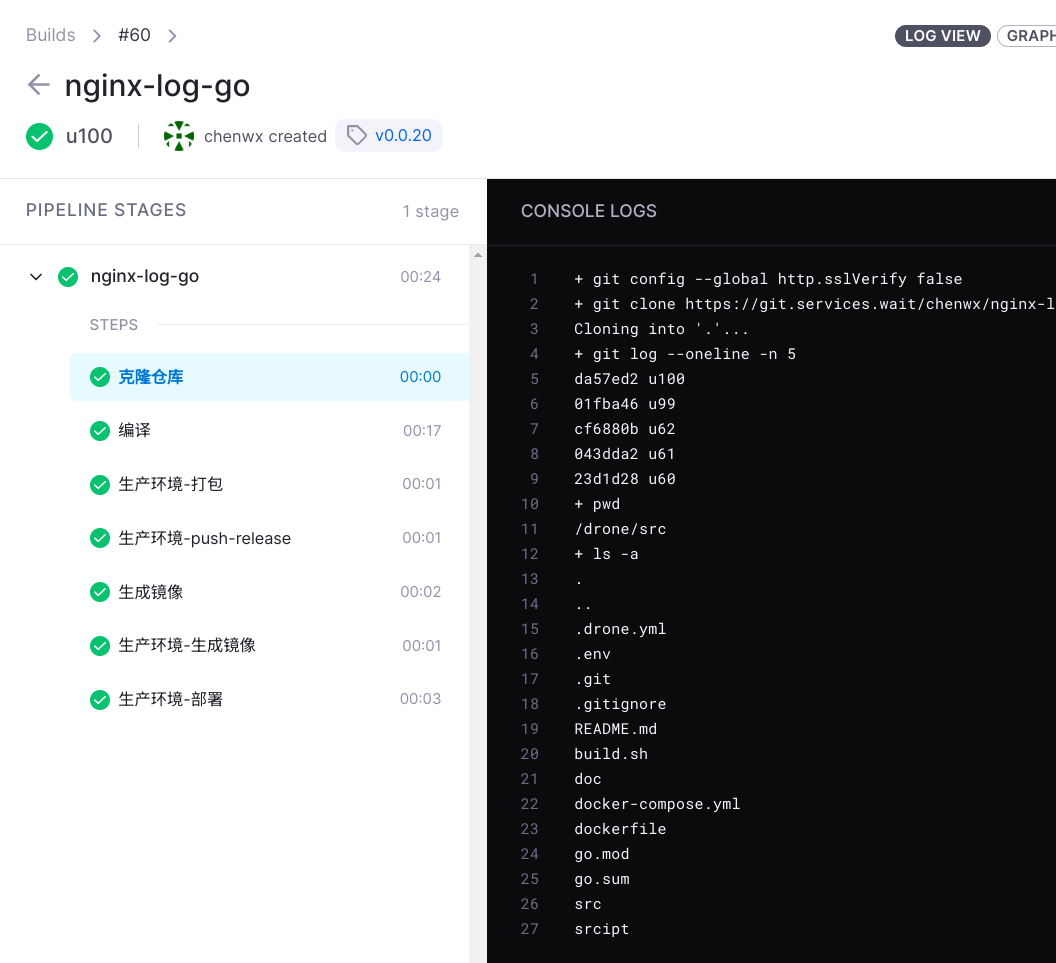
注解:
- 拉取代码后,进行编译
- 开发环境只是更新了远程主机的二进制文件,和生成了一个 docker 镜像
- 生产环境模拟做区分,推送一个 包 到 gitea 仓库
- 考虑不要用这个 docker 插件来打镜像,自己本地打似乎更好一些;
- 特别注意的是文件里面一些变量的引用方式很奇怪
  1
  2
  3
  4
  5
  6
  7
  8
  9
 10
 11
 12
 13
 14
 15
 16
 17
 18
 19
 20
 21
 22
 23
 24
 25
 26
 27
 28
 29
 30
 31
 32
 33
 34
 35
 36
 37
 38
 39
 40
 41
 42
 43
 44
 45
 46
 47
 48
 49
 50
 51
 52
 53
 54
 55
 56
 57
 58
 59
 60
 61
 62
 63
 64
 65
 66
 67
 68
 69
 70
 71
 72
 73
 74
 75
 76
 77
 78
 79
 80
 81
 82
 83
 84
 85
 86
 87
 88
 89
 90
 91
 92
 93
 94
 95
 96
 97
 98
 99
100
101
102
103
104
105
106
107
108
109
110
111
112
113
114
115
116
117
118
119
120
121
122
123
124
125
126
127
128
129
130
131
132
133
134
135
136
137
138
139
140
141
142
143
144
145
146
147
148
149
150
151
152
153
154
155
156
157
158
159
160
161
162
163
164
165
166
167
168
169
170
171
172
173
174
175
176
177
178
179
180
181
182
183
184
185
186
187
188
189
190
191
192
193
194
195
196
197
198
199
200
201
202
203
204
205
206
207
208
209
210
211
212
213
214
215
216
217
218
219
220
221
222
223
224
225
226
227
228
229
230
231
|
kind: pipeline
name: nginx-log-go
type: docker

# 私有镜像站认证信息
image_pull_secrets:
  - dockerconfigjson

# 因为有个性化的 clone 需求,所以这里关闭默认的 clone 动作
clone:
  disable: true

steps:
- name: 克隆仓库
  image: registry.wait/cwx/drone/git
  pull: if-not-exists
  settings:

    # clone 时截断以前的提交记录, 即克隆深度
    depth: 1
    skip_verify: true

    # 读取 git 的 tag 作为环境变量 ${DRONE_TAG}
    tags: true

  # 工作目录为 /drone/src
  commands:
    - git config --global http.sslVerify false
    - git clone https://git.services.wait/chenwx/nginx-log-go.git .
    - git log --oneline -n 5
    - pwd
    - ls -a

# - name: build
- name: 编译
  image: registry.wait/cwx/golang:1.20.3
  pull: if-not-exists
  depends_on: [克隆仓库]

  volumes:
    - name: gopath-1.20.3
      path: /go

  commands:
    - go env -w GOPROXY=https://goproxy.cn,direct
    - export CGO_ENABLED=0
    - go build -o bin/nginxLog -ldflags '-s -w' src/main.go
    - ls bin


# 有 tag 时,制作一个 压缩包
- name: 生产环境-打包
  image: registry.wait/cwx/os/alpine:3.17.3
  depends_on: [编译]
  commands:
    - ls -a
    - cd bin
    - tar zcvf nginxLog-${DRONE_TAG##v}.tar.gz ./nginxLog
  # 匹配全部tag
  when:
    ref:
      - refs/tags/**

# 提交一个 release 版本到 gitea
# gitea-release 插件只适用于有 tag 的情况
- name: 生产环境-push-release
  image: registry.wait/cwx/drone/plugins/gitea-release
  pull: if-not-exists
  depends_on: [生产环境-打包]
  settings:
    api_key: 2a5ab57061a66a6f37233a3fac07029cb5ad6b76
    base_url: https://git.services.wait/
    files:
      # 上传文件时,把那个 v 前缀去掉
      - bin/nginxLog-${DRONE_TAG##v}.tar.gz

    # 如果存在则覆盖
    file_exists: overwrite
    title: 新版本发布-${DRONE_TAG}

    # 忽略 https 证书
    insecure: true
  volumes:
    - name: cwxCA
      path: /etc/ssl/certs/ca-certificates.crt

  when:
    ref:
      - refs/tags/**


# 使用 scp 传输到其它主机
- name: 开发环境-推送
  image: registry.wait/cwx/drone/appleboy/drone-scp
  pull: if-not-exists
  depends_on: [编译]
  settings:
    host: 10.2.1.5
    username: wait
    key:
      from_secret: wcn7_wait_key
    port: 22
    target: /home/wait/data/pkg/${DRONE_REPO_NAME}
    source: bin/nginxLog
  when:
    ref:
      exclude:
        - refs/tags/**

# 到远程主机执行命令
- name: 开发环境-部署
  image: registry.wait/cwx/drone/appleboy/drone-ssh
  pull: if-not-exists
  depends_on: [开发环境-推送]
  settings:
    host:
      - 10.2.1.5
    username: wait
    key:
      from_secret: wcn7_wait_key
    port: 22
    command_timeout: 1m
    script:
      - cd /home/wait/data/pkg/${DRONE_REPO_NAME}
      - rm -f /home/wait/bin/nginxLog
      - mv bin/nginxLog /home/wait/bin/
  when:
    ref:
      exclude:
        - refs/tags/**

# 制作镜像
# 存在的问题,虽然插件最后有清理容器的动作,但没有实际执行成功
- name: 生成镜像
  image: registry.wait/cwx/plugins/docker:20.14.2
  pull: if-not-exists
  depends_on: [编译]

  settings:
    registry: registry.wait
    repo: registry.wait/cwx/nginx-log-go           # 私有仓库
    tags:
      - dev
    no_cache: true

    # 自动分割 git tag 的标签
    # auto_tag: true
    dockerfile: dockerfile

    # 允许不安全的通信, 实际测试没生效,还是得挂证书
    # insecure: true

    username:
      from_secret: docker_registry_username
    password:
      from_secret: docker_registry_password
  volumes:
    - name: cwxCA
      path: /etc/ssl/certs/ca-certificates.crt
    - name: docker
      path: /var/run/docker.sock


# 制作镜像
# 此处采用 docker in docker 的方式目的是不想二次生成镜像
- name: 生产环境-生成镜像
  image: registry.wait/cwx/docker:23.0.4
  pull: if-not-exists
  depends_on: [生成镜像]

  volumes:
    - name: docker
      path: /var/run/docker.sock
    - name: docker_configjson
      path: /root/.docker/config.json

  environment:
    IMG_NAME: registry.wait/cwx/nginx-log-go
    # USERNAME:
    #   from_secret: docker_registry_username
    # PASSWORD:
    #   from_secret: docker_registry_password

  commands:
    - echo $TAG_NAME
    - echo ${TAG_NAME}
    - "docker tag $IMG_NAME:dev $IMG_NAME:${DRONE_TAG##v}"
    - "docker push $IMG_NAME:${DRONE_TAG##v}"

  #   - docker login -u $USERNAME -p $PASSWORD registry.wait
  #   - docker tag $IMG_NAME:dev $IMG_NAME:${DRONE_TAG##v}
  #   - docker push $IMG_NAME:${DRONE_TAG##v}

  when:
    ref:
      - refs/tags/**

# 生产环境-部署命令
- name: 生产环境-部署
  image: registry.wait/cwx/drone/appleboy/drone-ssh
  pull: if-not-exists
  depends_on: [生产环境-生成镜像]
  settings:
    host:
      - 10.2.1.5
    port: 22
    username: wait
    key:
      from_secret: wcn7_wait_key
    command_timeout: 1m
    script:
      - cd /home/wait/env_docker/nodes/wcn7/service
      - sed -i "/registry.wait\\/cwx\\/nginx-log-go/s/nginx-log-go:.*$/nginx-log-go:${DRONE_TAG##v}/" docker-compose.yml
      - docker compose up nginx-log-go -d
  when:
    ref:
      - refs/tags/**

volumes:
  - name: gopath-1.20.3
    host:
      path: /data/cache/gopath-1.20.3
  - name: cwxCA
    host:
      path: /home/wait/data/ca/cwxCA.pem
  - name: docker
    host:
      path: /var/run/docker.sock
  - name: docker_configjson
    host:
      path: /home/wait/.docker/config.json
|
实例4: 当前站点的发布实践
看起来还有很多改进的空间, 但是我后来发现了 gitea-runner 这一套了, 就不再想用 drone 了。
回头看我还是很喜欢的 drone 的纯容器模式。使用 runner 不得不接触大量的 js,虽然不复杂,但也挺麻烦的。
.drone.yml 文件
 1
 2
 3
 4
 5
 6
 7
 8
 9
10
11
12
13
14
15
16
17
18
19
20
21
22
23
24
25
26
27
28
29
30
31
32
33
34
35
36
37
38
39
40
41
42
43
44
45
46
47
48
49
50
51
52
53
54
55
56
57
58
59
60
61
62
63
64
65
66
67
68
69
70
71
|
kind: pipeline
type: kubernetes
name: myblog
service_account_name: drone

# 因为有个性化的 git 需求, 所以这里禁用默认的 clone
clone:
  disable: true

# 触发器
trigger:
  event:
    - push

steps:

- name: 克隆仓库
  image: registry.services.wait/cwx/drone/git
  pull: if-not-exists
  settings:
    depth: 1
    skip_verify: true
    tags: true

  environment:
    GITEA_TOKEN:
      from_secret: git_token
  commands:
    - git config --global http.sslVerify false
    - git clone https://chenwx:$GITEA_TOKEN@git.services.wait/chenwx/myblog.git .
    - git clone https://chenwx:$GITEA_TOKEN@git.services.wait/chenwx/hugo-theme-stack.git themes/hugo-theme-stack

- name: 编译
  image: registry.services.wait/cwx/hugo:ubuntu-v0.118
  pull: if-not-exists
  depends_on: [克隆仓库]
  commands:
    - hugo
    - tar zcvf myblog.tar.gz -C public/ .


- name: 推送
  image: registry.services.wait/cwx/drone/appleboy/drone-scp
  pull: if-not-exists
  depends_on: [ 编译 ]
  settings:
    host: 10.2.1.5
    username: wait
    key:
      from_secret: wait_ssh_key
    port: 22
    source: myblog.tar.gz
    target: /tmp/


- name: deplay
  image: registry.services.wait/cwx/drone/appleboy/drone-ssh
  pull: if-not-exists
  depends_on: [ 推送 ]
  settings:
    host:
      - 10.2.1.5
    username: wait
    key:
      from_secret: wait_ssh_key
    port: 22
    command_timeout: 1m
    script:
      - rm -rf /data/nfs_private/blog-web-data/blog/*
      - tar xf /tmp/myblog.tar.gz -C /data/nfs_private/blog-web-data/blog/
      - rm -f /tmp/myblog.tar.gz
|